Home   About Me 
Showing posts with label Technology. Show all posts

Thursday, March 17, 2011

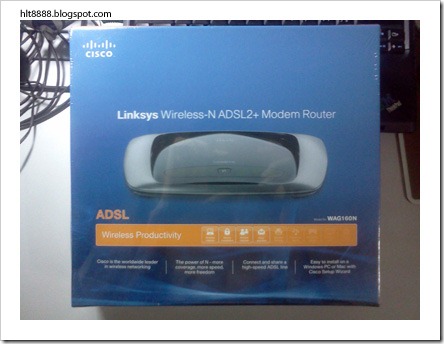
Unboxing CISCO Linksys WAG160N

The following will show what are the things included in the CISCO Linksys WAG160N Modem Router which i have bought during IT Show 2011 March.
IMG080

IMG083

IMG085

IMG087

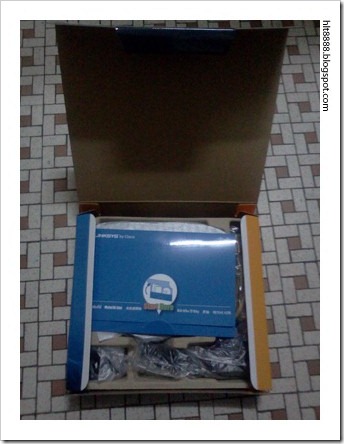
Items as shown in the above photo are:

  1. WAG160N Modem Router
  2. Installation CD (packaged in the blue envelop)
  3. Phone line cable
  4. LAN cable
  5. 3-pin connector
  6. 2-pin connector
  7. Power adapter

IMG088

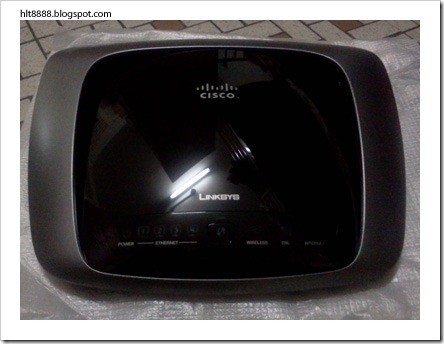
The spaceship looking WAG160N Modem Router ^_^
IMG089

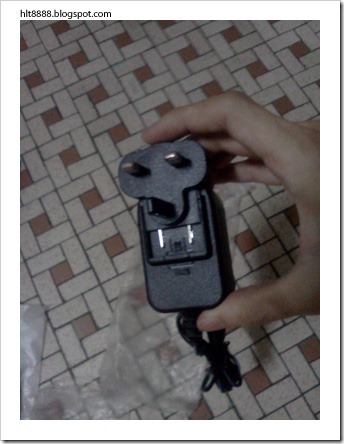
Users are given to options to choose whether they want to use the 3-pin connector or the 2-pin connector for your power adapter. For me i chose to use the 3-pin connector. Just slot the connector into the power adapter as shown in the above photo. Once its done correctly, it should look something like the one in the photo below.

IMG090

IMG092

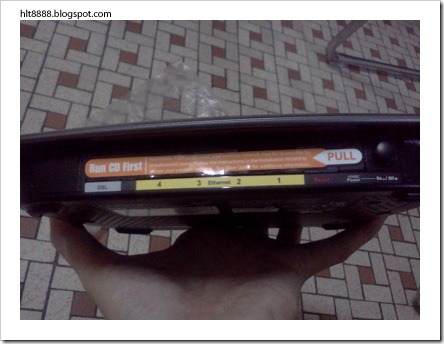
It comes with 1 DSL line-in for internet source and 4 Ethernet slots.

IMG093

This is the installation CD. Just run it and follow the steps and everything will be setup nicely… ^_^


IT Show 2011 March

Wahaha~! IT show… time to get some gadgets~! Let’s take a look at this new mouse that I have bought from there…

P1030389

IMG079

I bought this PowerLogic GMX-5 Laser Mouse at S$28.00. I have been using the IBM mouse that comes with my IBM T60 Laptop for around 3+ years… and its clicks starts to get less responsive… so bought this new one… lol ^_^

This GMX-5 has got these 2 buttons on its left side. The 2 buttons serve as a forward and backward button when surfing net on browsers. But i seldom use the 2 buttons… maybe just not use to it… lol ^_^

It has another circle button behind the scrolling wheel. That button is toggle button to change the mouse’s sensitivity. It has 3 modes of sensitivity, low, moderate and high.

Next, is this modem router that i have bought there one day after i bought that mouse…

IMG080

IMG082

I bought this CISCO Linksys Wireless-N ADSL2+ WAG160N Modem Router at S$149.00. I have been using the 2WIRE 2701HGV-E Modem Router that comes with SingTel MIO Home package… Seriously, I have bad experiences using that 2WIRE Modem Router… I have like 2-3 of that as I have been using SingNet Broadband for quite a couple of years. That modem router disconnect me from the internet quite often after like 1 year of usage… so its like its life span is only 1 year… thereafter, it will give you headache…

That's why I bought this CISCO Linksys Modem Router, hoping that it will perform better than that given by SingTel. ^_^


Saturday, November 20, 2010

Got enough of iPhone and wanted to try out Android OS?

You can use your existing iPhone to install and have a feel of android os without having to spent much money. ^_^

Look at the following link for a step by step guide on how to do it!
Lifehacker, tips and downloads for getting things done
Published with Blogger-droid v1.6.5


Tuesday, July 20, 2010

AVG9 File Scanner for MSN

In msn, under the File Transfer Options, we have to set the file scanner for handling the files our friends share with us.

If you are an AVG user, you might probably be asking, which one is the file scanner? Because there are so many executable files in the AVG folder, so this is a problem i faced when trying to setup file scanner for MSN File Transfer Options.

 image

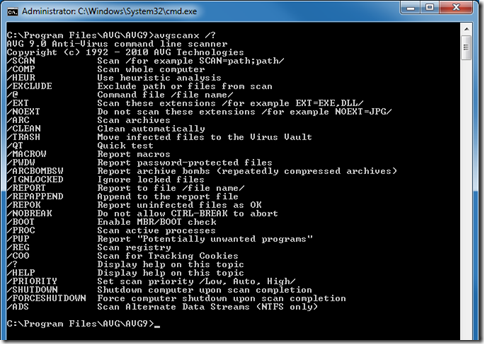
I am currently using the AVG9. So, the AVG file scanner is the avgscanx.exe (might varies for different versions). But we don't just point to this executable file in MSN for the file scanner. In fact, the avgscanx.exe is a command which requires us to input in parameter(s). The following is the list of parameters options for this command.

image

So we have to create a batch file with the following content:

@echo on
"C:\Program Files\AVG\AVG9\avgscanx.exe" /SCAN=%1 /HEUR /ARC /PUP /CLEAN
pause

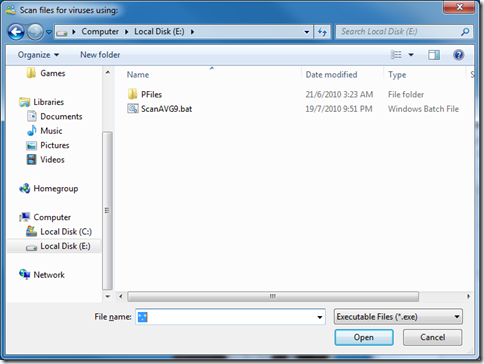
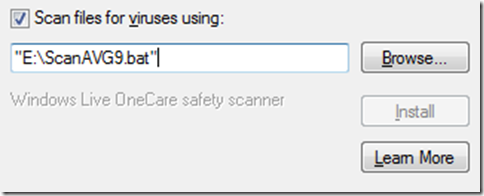
And then save it at any place as any name you like as long as it is a batch file (eg. E:\ScanAVG9.bat). Go to the MSN File Transfer Options to browse to the folder you just saved your batch file.

image 

When you reached there you will notice that the batch file is not shown up. Type in “*.*” in the FIle name text field and press enter, this will show all files in the folder and therefore also show up your batch file. Select it, click open and there you go.

image

Now when ever after your friends sent you files, a command prompt will popup and do the scanning and show you the results of the scan that looks similar to the following screenshot.

image


Info reference from: http://www.mydigitallife.info/2009/07/07/how-to-use-avg-anti-virus-scanner-with-msn-windows-live-messenger-winzip-winrar-download-express-miranda-im/


Friday, May 15, 2009

Testing PSU (Power Supply Unit) without using Mainboard

Went to Eddy’s house today to see (eye power… LoL) NYC helping Eddy to troubleshoot his PC. Saw how he test if the PSU is working. Its amazing to me. I didn’t know it can be done that way until he show it to me, cool!

I was told that a PSU won’t run unless it is connected to a mainboard. So how to test a PSU without connecting it to the mainboard?

Firstly you need a PSU and a jumper wire. Oh yah, and a power source too… of course… . Connect the PSU to the power source and power it on. By using the jumper wire (or anything similar and is safe), short the Power on (or PS_ON#) pin and the Ground (or GND) pin of the PSU main connector. The following 2 pictures show the layout of the PSU main connector of 20-pin ATX and 24-pin ATX.

20pinATX_powerSupplyConnector    24pinATX_powerSupplyConnector

It is said that when the Power on pin is pulled to TTL (Transistor–Transistor Logic) low, the PSU will start to provide those ±12V, ±5V and +3.3V to the outlet cables. For more infomation on why is it designed like this, read section 3.3.2 PS_ON# (page 19) of this pdf file –> http://www.formfactors.org/developer%5Cspecs%5CATX12V_1_3dg.pdf

Therefore we can simulate this TTL low by shorting the Power on pin to the Ground pin. In another words, just short the Green wired pin with any Black wired pin will do.

However, it is also mentioned in this article that doing this repeatedly or too many times can cause damage to your PSU. So I wouldn't recommend doing this on your own PSU (which means: feel free to do it if you are helping your friend to troubleshoot his/her PC… wahahaha~!), unless it is a last resort.

Oh and I found this article that shows you the whole process with photos.
http://lichyetan.blogspot.com/2009/03/how-to-jump-start-atx-power-supply-unit.html


Tuesday, February 24, 2009

Samsung 160GB 2.5’ Portable Hard Disk

Samsung 160GB Portable HDD 

Finally got myself a portable hard disk. Storage size of 160GB. Bought it from Sim Lim Square at the price of S$72.00.

As shown on the photo on the right. it comes with a USB cable, a black coloured pouch, a small cross-head screwdriver and the Hard Disk with its aluminum casing on.

The picture below shows how it looks when it is connected to the PC. The LED blinks green and red.

HDDrunning


Monday, October 20, 2008

Windows Live Messenger Error code: 8e5e0531

A few days ago, I was told by my Windows Live Messenger (if I remember correctly, it was version 8.5) that I can’t login to my MSN because there is a newer version of Windows Live Messenger. I was also given the link to the download page. So I clicked on the link: get.live.com/messenger/overview and downloaded the installation file. But the installation file doesn’t seems to work. Because its an online installation process, so I thought its the connection problem to the installation server.

So I waited for a few hours, I tried to install it again, same thing, installation failed. So I search for alternative source for the installation file and came across this webpage –> download.live.com/messenger. I finally managed to login to my MSN after the download and installation.

   
Picture taken from
http://download.live.com/messenger
Picture taken from
http://get.live.com/messenger/overview


End of nightmare? NO~!

After the update from Windows Live Messenger Version 8.5 to Windows Live Messenger Beta Version 2009 (Build 14.0.5027.908) from the download.live.com/messenger,

wlm-version2009-14-0-5027-908

it still gives me problem~!

Sometime, I am able to login to my MSN, sometime I can’t! And even when I am logged in, after a few hours, it will automatically log me out~! Then after the logout, my attempt to login again gives me this Error Code: 8e5e0531.

So I tried Google the solution to solve the Error Code: 8e5e0531 problem and I came across this webpage –> Click Here.

It says,
“First of all you can try rebooting your machine then you could try use the repair function on msn.

You could also try resetting ur modem and make sure your firewall is not blocking msn or the ports.”

I tried and it really works. But to restart PC every few hours (because the WML log me out every few hours) is really very troublesome. If anyone has a solution for this problem, please do leave a message on the Chatting Zone. Thanks in advance.


Thursday, October 02, 2008

Create Your Avatar


Want to create a nice avatar? Lack of photoshop skills to do the job?

Try this one over here. Its very simple and user-friendly as shown on the left, a screenshot of the website.


Saturday, July 26, 2008

Backlight Problem of Samsung SGH-I450


Alright I finally settled my handphone problem mentioned in the earlier post fixed.

The Backlight Problem is caused by the incompatability between the Singtel 3G SIM card and the I450 firmware. Heard that is due to some difference in the voltage specs...

Went down to the Samsung Mobile Phone Customer Service to ask for a fix to this Backlight Problem, but they told me that the another version of the I450 firmware is not yet ready and asked me to leave down my contact number so that they can contact me when its ready. And they say it will most likely take around 1 or 2 months. They also told me that the I450 firmware that my phone is having now, does not have this problem with an older version of Singtel 3G SIM card, but they are not very sure of what version or which batch of the Singtel SIM card it is.

So, I walk all the way to ComCentre which is located somewhere nearby to get the SIM card changed. Done, Backlight Problem solved! Hurray!!!


Tuesday, July 22, 2008

Samsung SGH-I450


Yes! Its already 2 years since I last bought my Samsung SGH-E770. Its time to change new handphone. Today went out to many places to look for Samsung SGH-I450. It is not a very new handphone. Its already out in the market for around 1 year. Many handphone shops have already stop stocking in this model.


The photo on the left side,
is the Samsung SGH-I450.


The photo on the right side,
is the Samsung SGH-E770.


I bought mine at hello!@Bugis Junction there at 4:35pm. Heng there still got stock. This model comes with 3 different colour casings. White/red, White/blue and Black/red. I took the Black/red colour. I find those white one not so good because those white casing usually turns a bit yellowish after some time. Heard that the shop left 2 stock for the Black/red, I was so lucky... haha...

Spent S$198.00 for the phone with 2 years plan with Singtel.

Next I head down to Sim Lim Square to get the screen protector. Why sls? haha! Because last time I bought my screen protector for my Samsung SGH-E770 there. Just pay S$12.00 and the shop keeper there will help you clean the screen and paste the protector on. Good for me because I am not good at doing the job myself.

This time when I went there, I could find neither the screen protector for this model nor any screen protector that has the same screen size as I450. So I go and ask the shop keeper there and she suggest to use a bigger one to cut to 2.4" for my I450.

Total damage: S$210.00

Unlike many Samsung handphone, I450 have relatively louder ringtone to me. But in terms of camera, its just "so so only".

Now the only problem I found on I450 is the "Backlight Problem". When left idle, the backlight will auto light up itself at 30sec interval. Not sure if it is a feature or what, but I think that will drain the battary faster. Have to go to the Samsung service centre to see if its a problem or did I set some wrong settings that makes it like this.


Sunday, December 16, 2007

Mouse Autopsy 滑鼠大解剖


This is a Logitech Optical Mouse. Let's open it up to see what is inside and what can I recycle from it.


There you see a circuit board, a USB cable connected to the circuit board, a roller and the shell of the mouse.


Let's take a closer look at the circuit board. On the top part of the circuit board, there is 3 black colour components, those are the mouse clicking buttons of the mouse.
This mouse was abandoned because of its left click button is spoilt, so probably is the top left black colour component on the circuit board.
The USB cable can be disconnected from the board for recycle.


~~~ After 30 minutes of desoldering and cutting ~~~


Ok, these are those that i think is of not much usage. The IC chips, phototransister, infra-red emitter, capacitors and the board (components named here might be wrong).


This is the spoilt left click button. There is no more "click" sound or feel when it is pressed.


These are the component that I reserved for later used.
2 x button switches, 1 x 5pin connection seat, 2 x resistors, a LED attatched to a acrylic plastic and a USB connection cable.


These are the components that was thrown away.


Wednesday, February 14, 2007

My Elevator Simulator

This is my Elevator Simulator made using Java.


Sunday, July 23, 2006

hahahaha finally got my 1st camera phone! Samsung SGH-E770! cool!


Related Posts Plugin for WordPress, Blogger...