Home   About Me 
Showing posts with label MSN. Show all posts

Tuesday, July 20, 2010

AVG9 File Scanner for MSN

In msn, under the File Transfer Options, we have to set the file scanner for handling the files our friends share with us.

If you are an AVG user, you might probably be asking, which one is the file scanner? Because there are so many executable files in the AVG folder, so this is a problem i faced when trying to setup file scanner for MSN File Transfer Options.

 image

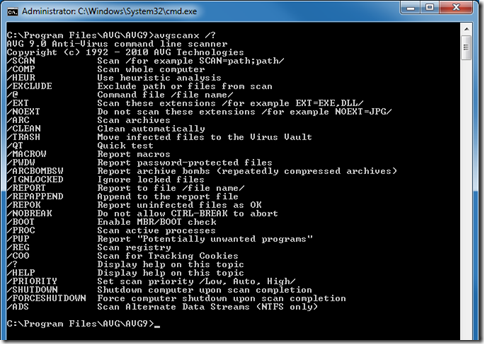
I am currently using the AVG9. So, the AVG file scanner is the avgscanx.exe (might varies for different versions). But we don't just point to this executable file in MSN for the file scanner. In fact, the avgscanx.exe is a command which requires us to input in parameter(s). The following is the list of parameters options for this command.
image

So we have to create a batch file with the following content:

@echo on
"C:\Program Files\AVG\AVG9\avgscanx.exe" /SCAN=%1 /HEUR /ARC /PUP /CLEAN
pause

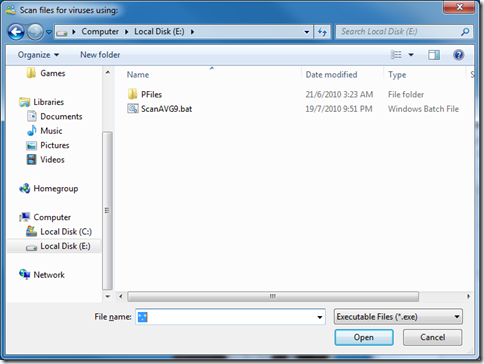
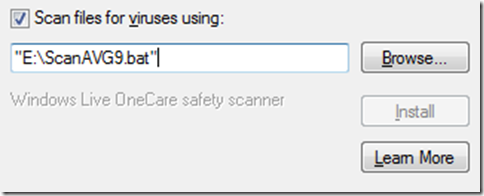
And then save it at any place as any name you like as long as it is a batch file (eg. E:\ScanAVG9.bat). Go to the MSN File Transfer Options to browse to the folder you just saved your batch file.
image 

When you reached there you will notice that the batch file is not shown up. Type in “*.*” in the FIle name text field and press enter, this will show all files in the folder and therefore also show up your batch file. Select it, click open and there you go.
image

Now when ever after your friends sent you files, a command prompt will popup and do the scanning and show you the results of the scan that looks similar to the following screenshot.

image


Info reference from: http://www.mydigitallife.info/2009/07/07/how-to-use-avg-anti-virus-scanner-with-msn-windows-live-messenger-winzip-winrar-download-express-miranda-im/


Monday, October 20, 2008

Windows Live Messenger Error code: 8e5e0531

A few days ago, I was told by my Windows Live Messenger (if I remember correctly, it was version 8.5) that I can’t login to my MSN because there is a newer version of Windows Live Messenger. I was also given the link to the download page. So I clicked on the link: get.live.com/messenger/overview and downloaded the installation file. But the installation file doesn’t seems to work. Because its an online installation process, so I thought its the connection problem to the installation server.

So I waited for a few hours, I tried to install it again, same thing, installation failed. So I search for alternative source for the installation file and came across this webpage –> download.live.com/messenger. I finally managed to login to my MSN after the download and installation.

   
Picture taken from
http://download.live.com/messenger
Picture taken from
http://get.live.com/messenger/overview


End of nightmare? NO~!

After the update from Windows Live Messenger Version 8.5 to Windows Live Messenger Beta Version 2009 (Build 14.0.5027.908) from the download.live.com/messenger,

wlm-version2009-14-0-5027-908

it still gives me problem~!

Sometime, I am able to login to my MSN, sometime I can’t! And even when I am logged in, after a few hours, it will automatically log me out~! Then after the logout, my attempt to login again gives me this Error Code: 8e5e0531.

So I tried Google the solution to solve the Error Code: 8e5e0531 problem and I came across this webpage –> Click Here.

It says,
“First of all you can try rebooting your machine then you could try use the repair function on msn.

You could also try resetting ur modem and make sure your firewall is not blocking msn or the ports.”

I tried and it really works. But to restart PC every few hours (because the WML log me out every few hours) is really very troublesome. If anyone has a solution for this problem, please do leave a message on the Chatting Zone. Thanks in advance.


Related Posts Plugin for WordPress, Blogger...